
Configuration Management
The Settings Menu includes tools to import and export data, install extensions, manage system caches and indexes, manage permissions, backups, system notifications, and custom variables.
Click here for detailed information.
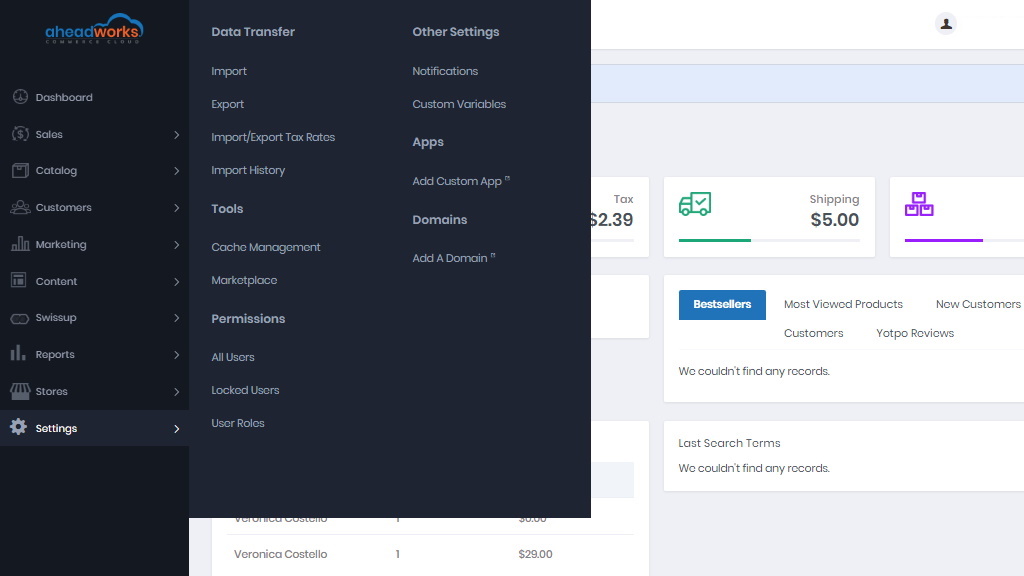
Data Transfer
These tools provide give you the ability to manage multiple records in a single operation. You can import new items, and also update, replace, and delete existing products and tax rates.
Extensions
Manage integrations and extensions for your store.
Tools
Use this collection of tools to manage your system resources, including cache and index management, backups, and installation settings.
Permissions
Adobe Commerce and Magento Open Source use roles and permissions to create different levels of access for Admin users, which gives you the ability to grant permission on a “need to know” basis to people who work on your site.
Action Logs
The Action Log tracks the activities of administrators who work in your store. For most events, the available information includes the action, the name of the user who performed it, whether it was a success or failure, and the ID of the object that was the target of the action. The Admin Actions archive lists the CSV log files that are stored on the server.
Other Settings
Manage the notifications in your inbox, create custom variables, and generate a new encryption key.
General Settings
Open Stores > Settings > Configuration > General > General.
Country Options
In the Country Options field, you can configure the following fields and options:
- Default Country - the country where your store is located;
- Allow Countries - the countries where you accept orders;
- Zip/Postal Code is - optional for Countries that do not require a ZIP or postal code in the shipping address;
- European Union Countries - countries that are members of the European Union;
- Top destinations - the primary countries that you target for sales.
State Options
In the State Options field, you can configure the following fields and options:
- State is Required for - the countries where you conduct business that require a region or state to be included in the postal address;
- Allow to Choose State if It is Optional for Country - For countries where it is not required, determines if the Region/State field is included in the postal address of the customer:
- When it’s set to Yes - the Region/State field is included in the customer address, even if not required by the country;
- When it’s set to No - the Region/State field is not included from the customer address if not required by the country.
Locale Options
In the Locale Options field, you can configure the following fields and options:
- Timezone - the time zone of the primary market;
- Locale - the language, currency, and system of measurement that is used in the market served by the store view;
- Weight Unit - the unit of measurement that is typically used for shipments;
- First Day of Week - the day that is considered to be the first day of the week;
- Weekend Days - the days that fall on the weekend in the market.
Store Information
In the Store Information field, you can configure the following fields and options:
- Store Name - the name of the store;
- Store Phone Number - the primary telephone number of the store;
- Store Hours of Operation - the operation hours of the store;
- Country - the country where the business is located;
- Region/State - the region or state where the business is located;
- ZIP/Postal Code - the ZIP or postal code where the business is located;
- City - the city where the business is located;
- Street Address - the street or mailing address of the business that operates the website;
- Street Address Line 2 - the second line of the business street address, if needed;
- VAT Number - the Value Added Tax number of the business that owns the Commerce installation, if applicable.
When complete, click the Save Config button. When prompted, refresh any invalid cache.