
Manage the Сache
Cache is a software component that stores data so that future requests for that data can be served faster.
Caching is one of the most effective ways to improve website performance. Generally speaking, there are two methods of caching content:
- Client-side (browser)
- Server-side
Retrieving stored (cached) content from a previous request for the same client instead of requesting files from your server every time someone visits your site is a more efficient use of network bandwidth.
Aheadworks Commerce Cloud provides the server-side caching - stores your images, styles, configuration, etc., so that to enable faster storefront loading and access.
Aheadworks Commerce Cloud has the following cache types:
| Configuration |
Various XML configurations that were collected across modules and merged |
|
Layout |
Layout building instructions |
|
Block HTML output |
Page blocks HTML |
|
Collections data |
Collection data files |
|
Reflection Data |
API interfaces reflection data |
|
Database DDL operations |
Results of DDL queries, such as describing tables or indexes |
|
Compiled Config |
Compilation configuration |
|
EAV types and attributes |
Entity types declaration cache |
|
Customer Notification |
Customer Notification |
|
Integrations Configuration |
Integration configuration file |
|
Integrations API Configuration |
Integrations API configuration file |
|
Page Cache |
Full-page caching |
|
Web Services Configuration |
REST and SOAP configurations generated WSDL file |
|
Translations |
Translation files |
|
Vertex |
Vertex tax calculation data |
Please note:
There are different modes that your store can be operating in:
- Default or Sandbox (your store is right away provisioned in this mode, and your sandbox instance will remain in this mode at all times)
- Production (your production instance will be set in the production mode once you are ready to go live)
Why this is important?
Because in Default/Sandbox mode you are allowed to DISABLE caching, so that you could avoid the necessity to refresh cache in the process of setting up your store. This way all the configuration changes will be reflected on the storefront immediately, but this can influence the page loading time.
In Production mode you do not have the possibility to disable caching. This is to provide faster page loading speed to your customers. This means you will have to Refresh cache every time you make any changes to configurations, add new content, etc.
Disable, refresh and flush cache types
To purge out-of-date items from the cache, you can refresh or flush cache types:
Refreshing (cleaning) a cache type deletes all items from enabled cache types only. In other words, this option does not affect other processes or applications because it cleans only the cache that the store uses. Disabled cache types are not refreshed.
To disable cache you need to select unnecessary cache type(s) and from the Action drop-down menu select Disable option. Next, you can click the ‘Flush Magento Cache’ button to make sure that the cash has been disabled.
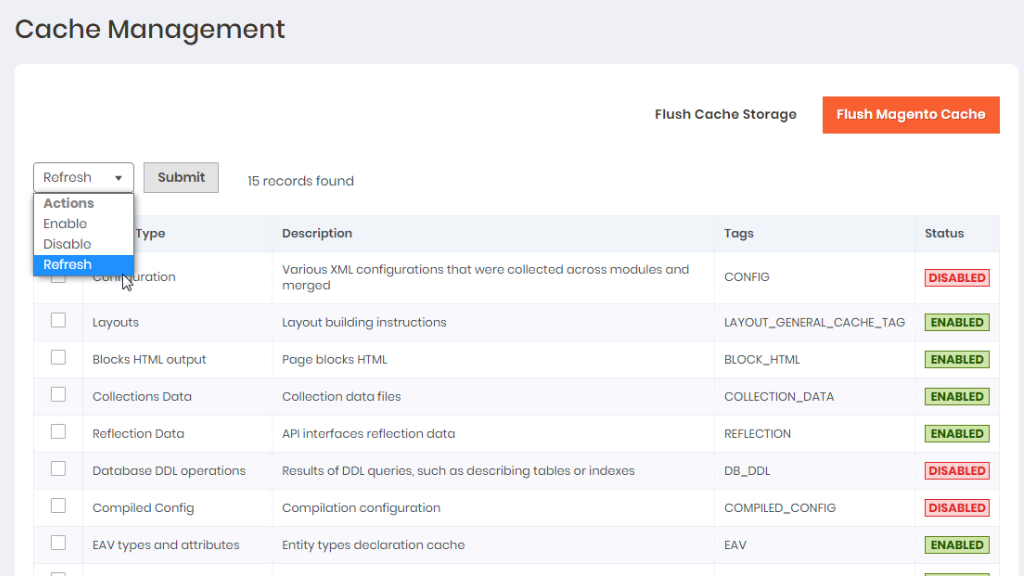
When you change configurations, apply a new theme, translate your store into another language, etc. to increase the performance of storefront loading you need to refresh caches.
You can refresh cache types in the Admin panel. Follow to Settings > Tools > Cache Management.
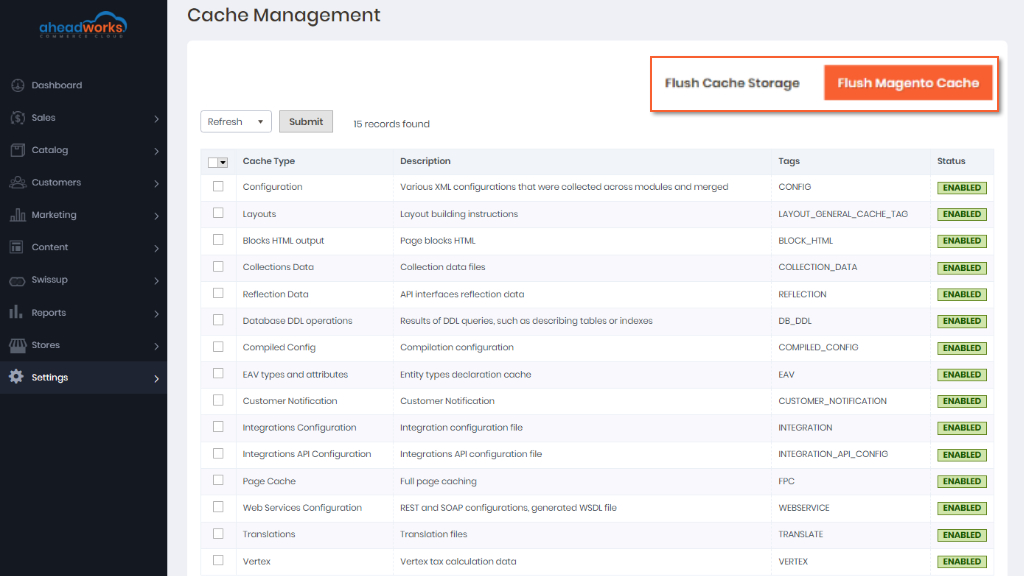
To refresh select the checkbox at the beginning of the row. From the Actions drop-down list, select Refresh and click Submit.
Also, you can select a group of caches. Set Mass Actions to one of the following: Select All, Select Visible. Select the checkbox of each cache type to be targeted by the action, select Refresh and click Submit.
Read more: